Motivation
When running multiple services in a #homelab, private certificates become a nuance, also, when sharing these services with other people it can become a "support nightmare" the security risks notifications in browsers for non tech-users.
By enabling one Debian VM/LXC container as the locally centralized point of automated request, update and have them ready to consume by other services/infrastructure you will be enabling a secure environment for most of your web based services.
The Stack: What You’ll Use
Debian VM/LXC - our preferred OS deSEC.io - DNS provider Certbot packages and Hooks systemd services and timers
Why deSEC and not Cloudflare
You COULD use Cloudflare for these services, and your CDN, reverse tunnels, etc. etc. and also be part of the more than frequent outages for their services or their constant changes in ToS, in a nutshell, Cloudflare became one of the centralization points in the internet, I strongly recommend using more friendly alternatives like deSEC, who in the other hand is:
- Non-profit
- API-first
- No proxy layer
- DNS only
- EU Based
- No CDN layer. No traffic inspection. No “free tier upsell later”.
For a #homelab, simpler is better. deSEC does DNS. Nothing else.
Architecture Overview
This little project does not need "infra architecture" it's all about services architecture.
[DebianVM] → Certbot-deSEC LE Request → deSEC API Challenge → SSL Generation → SSL Storage → SSL Cert Files Storage in distribution FolderStep-by-Step Guide
Install Debian Packages
apt install certbot python3-certbot-dns-desecCreate deSEC API Token
Log in to your deSEC account - (Create one)
Go to Token Management Section
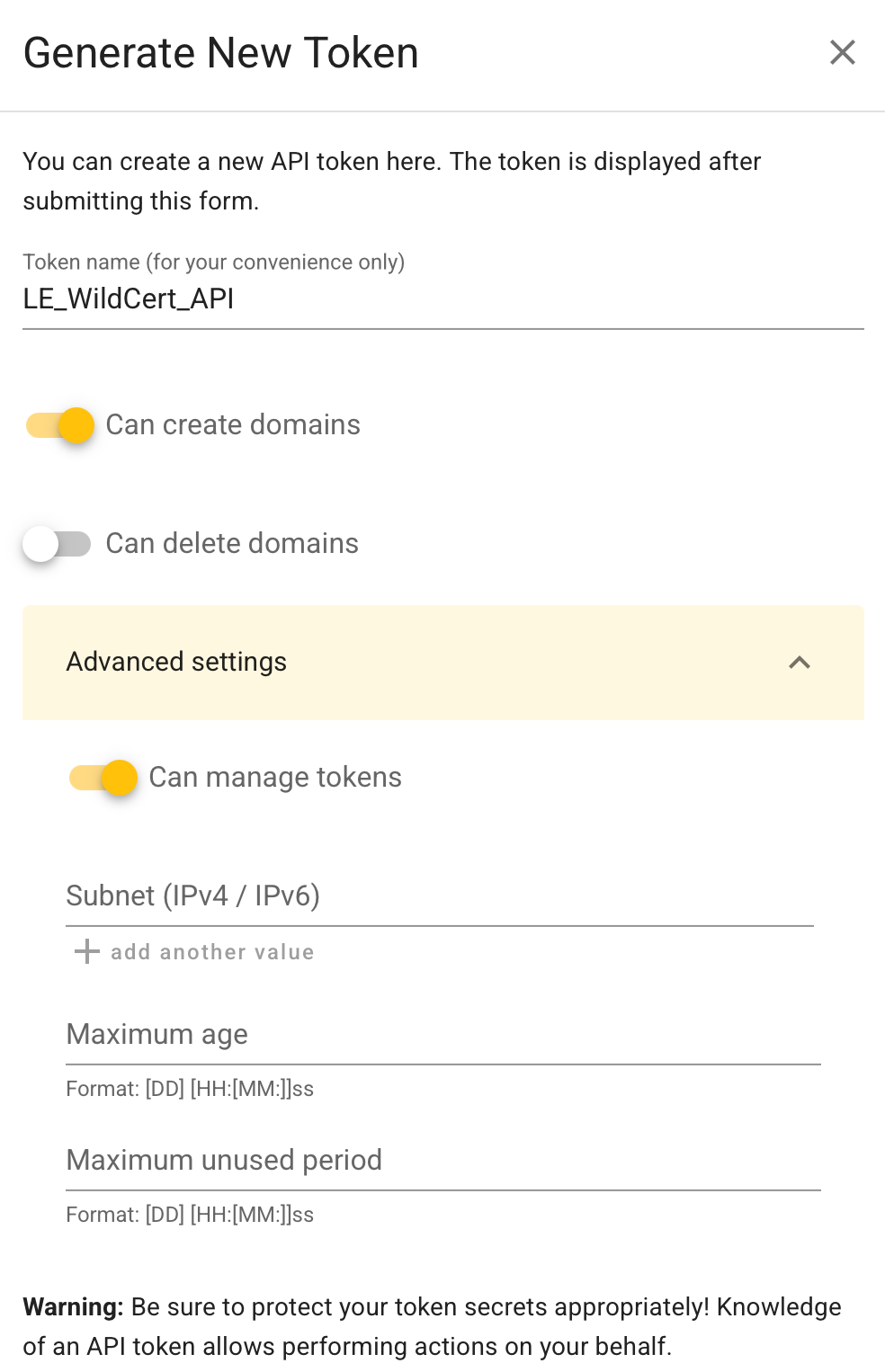
Create a new Token, with Edit Rights.
Store the API credentials in your VM/LXC
mkdir -p /root/.secrets
nano /root/.secrets/desec.ini
dns_desec_token = <YOUR_API_TOKEN>
Finally, lets make the file secure.
chmod 600 /root/.secrets/desec.iniRequest LE Wildcard Certificate
certbot certonly \
  --dns-desec \
  --dns-desec-credentials /root/.secrets/desec.ini \
  -d '*.yourdomain.com'
Once DNS propagation and Challenges are passed, you will have the generated .key and .pem files in:
/etc/letsencrypt/live/yourdomain.com/
Containing:
fullchain.pem privkey.pem
These are now your LIVE certificate files.
Renewal Automation Certbot (Donate to EFF!) configures a renewal systemd task, you should Verify:
systemctl list-timers | grep certbotand Test it:
certbot renew --dry-runExport Certificate to a Shared Directory
Now the important part.
Other nodes/service should not read /etc/letsencrypt. That directory is root-restricted and not designed for sharing. We will automate the copy and "export" of the .pem and .key files in the VM/LXC filesystem to enable a pull distribution in future. Create a dedicated export path:
mkdir -p /srv/certsCreate a "deploy" hook:
nano /etc/letsencrypt/renewal-hooks/deploy/export.shAnd add:
#!/bin/bash
SOURCE="/etc/letsencrypt/live/yourdomain.com"
TARGET="/srv/certs"

cp $SOURCE/fullchain.pem $TARGET/yourdomain-fullchain.pem
cp $SOURCE/privkey.pem $TARGET/yourdomain-privkey.pem

chmod 640 $TARGET/*
chown root:ssl-cert $TARGET/*
Make it executable:
sudo chmod +x /etc/letsencrypt/renewal-hooks/deploy/export.shNow every successful renewal automatically updates /srv/certs. This becomes your controlled distribution point for a locally available wildcard certificate.
Future Work
In Future we will be doing the following: Other Nodes authenticate to this VM Pull cert via: SSH rsync or Tailscale-restricted endpoint Services reload automatically Centralized issuance. Distributed usage. Clean.
Discussion
Why Not an Ingest Node? You might think:
“Why not make this a general ingest node using caddy/traefik/nginx/whatever for logs, metrics, reverse proxy, and cert authority?”
Because this is a #homelab. Not a cloud region. Simplicity is KING, we ought to avoid un-needed technical complexities.
One VM/LXC doing:
DNS challenges Certificate management Controlled export
is manageable.
One VM doing previous plus:
Reverse proxy Log ingestion Metrics processing Public exposure
is architecturally complex. In a one-man show/low support capacity, complexity is technical debt you personally repay at 2AM.
Separation of concerns keeps failure domains small.
Keep this VM boring. Boring infrastructure survives. Boring is good.
Conclusion
This method enables secure, low-friction valid FQDN/Domain SSL certificate acquiring for your #homelab services without exposing your LAN, relying only on tools that do one thing and do it well.
One certificate.
One place of truth.
No manual renewals.